This product is not meant for end-users and therefore there is no user-friendly installer. Please refer to the Setting up section to learn how to set up the project.
Starting the program
-
Find the project pane (usually located at the left side)
-
Open up
src/seedu.addressbookfolder -
Right click on
Main -
Click
Run Main.main() -
The GUI should appear in a few seconds
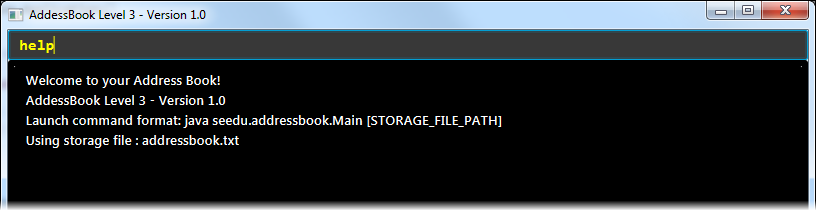
Viewing help : help
Format: help
|
Help is also shown if you enter an incorrect command e.g. |
Adding a person: add
Adds a person to the address book.
Format: add NAME [p]p/PHONE_NUMBER [p]e/EMAIL [p]a/ADDRESS [t/TAG]…
Examples:
-
add John Doe p/98765432 e/johnd@gmail.com a/John street, block 123, #01-01 -
add Betsy Crowe pp/1234567 e/betsycrowe@gmail.com pa/Newgate Prison t/criminal t/friend
Listing all persons : list
Shows a list of all persons in the address book.
Format: list
Finding all persons containing any keyword in their name: find
Finds persons whose names contain any of the given keywords.
Format: find KEYWORD [MORE_KEYWORDS]
|
The search is case sensitive, the order of the keywords does not matter, only the name is searched,
and persons matching at least one keyword will be returned (i.e. |
Examples:
-
find John
ReturnsJohn Doebut notjohn. -
find Betsy Tim John
Returns Any person having namesBetsy,Tim, orJohn.
Deleting a person : delete
Deletes the specified person from the address book. Irreversible.
Format: delete INDEX
Examples:
-
list
delete 2
Deletes the 2nd person in the address book. -
find Betsy
delete 1
Deletes the 1st person in the results of thefindcommand.
View non-private details of a person : view
Displays the non-private details of the specified person.
Format: view INDEX
Examples:
-
list
view 2
Views the 2nd person in the address book. -
find Betsy
view 1
Views the 1st person in the results of thefindcommand.
View all details of a person : viewall
Displays all details (including private details) of the specified person.
Format: viewall INDEX
Examples:
-
list
viewall 2
Views all details of the 2nd person in the address book. -
find Betsy
viewall 1
Views all details of the 1st person in the results of thefindcommand.
Clearing all entries : clear
Clears all entries from the address book.
Format: clear
Exiting the program : exit
Exits the program.
Format: exit
Saving the data
Address book data are saved in the hard disk automatically after any command that changes the data.
There is no need to save manually. Address book data are saved in a file called addressbook.txt in the project root folder.